


A chatbot is software that simulates a conversation with people through text (and sometimes voice). A chatbot works by receiving a message, identifying what the person wants (intent), extracting key details (like a date or service), and responding using rules, a knowledge base, or AI—often taking action through integrations like scheduling or a CRM when needed.
How chatbots work in one minute
Most chatbots follow the same core loop:
- Messages come in (website chat, SMS, Messenger, WhatsApp, etc.)
- Intent is detected (what the user is trying to do)
- Details are captured (like service type, city, preferred time) — commonly called “entities”/“slots”
- Response is chosen (rules, FAQ/knowledge base, or AI-generated response)
- Action happens via integrations (book a slot, create a lead, send a confirmation) — often called “fulfillment”
- Handoff to a human if the request is complex or confidence is low
Read more: How to use chatbots for marketing
What is a chatbot?
A chatbot is a conversational program designed to communicate with users in natural language. Some chatbots are simple and rule-based (buttons + decision trees). Others use conversational AI, including natural language processing (NLP), to understand questions and respond more flexibly.
According to The Oxford Dictionary…
A Chatbot: A computer program designed to simulate a conversation with human users, especially over the Internet
Well, the fact is chatbots are making their presence felt everywhere through all sorts of organizations, businesses, and even in our social lives. A lot of the social platforms that we use such as Messenger, Facebook and Instagram are all using chatbots to deliver information. You will often see a help desk or a chat box when you visit many websites these days.
Many of these are all automated or artificial intelligence chatbots. Chatbots are around everywhere.
Where you’ll see chatbots
Chatbots can live in multiple places, including:
- Website chat (the most common place for lead capture)
- SMS/text messaging
- Facebook Messenger / Instagram
- Voice channels (voice bots / AI voice agents)
Chatbot vs live chat (quick difference)
- Chatbot: automated responses, instant triage, can run 24/7
- Live chat: human-only responses, limited by availability and staffing
Read more: What is the Purpose of a Chatbot?
How does a chatbot work? (Step-by-step)
Chatbots work by combining understanding (interpreting what the user means) with response selection (what to say) and actions (what to do next).
Step 1: A user sends a message
The customer types a question like:
“Can I book a plumber for tomorrow afternoon?”
Step 2: The chatbot matches intent
An “intent” is the user’s goal in that moment (book an appointment, get pricing info, check hours, etc.). Platforms commonly classify user inputs into intents as the foundation of the conversation.
Step 3: The chatbot extracts key details (entities/slots)
To complete the request, the chatbot gathers required details (for example: “tomorrow afternoon,” “plumber,” location, phone number). Many chatbot systems explicitly model these as required fields/slots.
Step 4: The chatbot picks the response method
A chatbot can respond in different ways:
- Rules/decision tree: “If they ask X, show Y buttons”
- Knowledge base / FAQ retrieval: pulls from approved answers
- AI-generated response: uses an AI model to draft a reply (usually with guardrails and approved sources)
Modern chatbots increasingly use NLP and conversational AI to interpret requests and automate responses.
Step 5: The chatbot performs an action (fulfillment)
If the user wants something done (book, reschedule, create a lead, send confirmation), the bot calls a system you define—calendar, CRM, form, database, etc. This is often described as “fulfillment,” where an intent triggers business logic through an integration/webhook.
Step 6: Confirmation + logging
The chatbot confirms what happened (“You’re booked for 3:00 PM tomorrow”) and logs the conversation so your team can follow up.
Step 7: Human handoff when needed
Good chatbots don’t pretend they’re human. They escalate when:
- the request is complex
- the bot is uncertain
- the customer is upset
- sensitive topics appear
- the customer explicitly requests a person
Read more: The Ultimate Guide to Chatbots
Types of chatbots (and which one you need)
Here’s the simplest way to choose the right chatbot type:
| Type | Best for | Strength | Limitation |
| Rule-based chatbot (buttons/flows) | FAQs, basic routing, simple lead capture | Predictable, easy to control | Feels rigid; struggles with free-text |
| NLP / intent-based chatbot | “I want to book,” “price,” “availability,” etc. | Understands common phrasing variations | Needs training and ongoing tuning |
| AI / LLM chatbot (with guardrails) | Rich Q&A, nuanced questions, multi-step conversations | More natural conversation; broader coverage | Must be constrained to avoid wrong answers |
What can a chatbot do for a local business?
If you’re a service business, chatbots tend to deliver ROI in a few predictable places:
1) Capture and qualify leads (even after hours)
A chatbot can collect:
- name + contact
- service needed
- location/service area
- urgency
- preferred time window
2) Book appointments
If you connect it to your calendar system, a chatbot can offer available times and confirm the booking via fulfillment/integrations.
3) Answer high-volume questions instantly
Examples:
- hours
- service areas
- pricing ranges (when appropriate)
- what to do next / preparation steps
- FAQs about your process
4) Reduce missed opportunities
Many businesses lose leads because the first response is slow. A chatbot can respond immediately and route urgent requests.
5) Hand off to a human at the right moment
A chatbot should accelerate the path to a real conversation when the situation requires it.
Chatbot vs AI voice agent vs live receptionist
Use this to pick the right “front door”:
- Chatbot: best when customers prefer typing (website/SMS/social), and you want fast lead capture + FAQ + basic booking.
- AI voice agent: best when your business is phone-first and missed calls are a major revenue leak.
- Live receptionist: best when intake requires judgment, empathy, or complex scheduling.
Read more: Implementing Chatbots: A Step-by-Step Guide for Local Businesses
How to set up a chatbot (simple checklist)
If you want a chatbot that actually converts, use this checklist:
- Choose channels (website chat, SMS, Messenger, WhatsApp)
- List your top 10 customer questions
- Define your lead qualification fields (what you must capture)
- Write clear handoff rules (“talk to a person” option)
- Connect your tools (calendar, CRM, email/SMS, forms)
- Add tracking (chat started, lead captured, appointment booked)
- Test on mobile + after-hours + edge cases
- Review transcripts monthly and improve prompts/flows
Best practices for chatbots that feel helpful (not annoying)
- Keep the first message short and action-oriented
- Offer 2–3 quick options (“Book,” “Pricing,” “Talk to a human”)
- Ask one question at a time
- Don’t hide the handoff
- Don’t let AI improvise pricing/medical/legal advice—use approved answers
- Use conversation logs to continuously improve
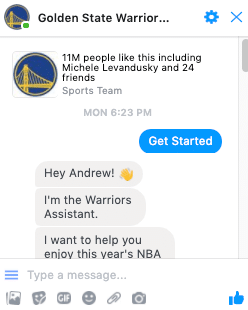
How do you install a chatbot?
Basically, without getting too technical, it’s just a little piece of code that integrates, in our case with Facebook. We love using Facebook because everybody’s got Facebook in your pocket right now. You’ve probably got the Facebook app on your phone, which means you can integrate chatbots very, very easily.
 The cool thing about using Facebook and chatbots is that when people are interacting with your business, they think that they’re talking to you through Facebook. In actual fact, chatbots are using a third-party service, that lets you have that easy conversation with people on the Facebook platform.
There are a number of third-party services out there that you can use, without having to know any code. Some of the services we have used in the past include manychat, chatfuel and Mobilemonkey All of these services have a mountain of training videos and beginner information all levels of marketer and business owner. We personally LOVE manychat and recommend it to all of our clients.
What sort of tasks can you do with a chatbot?
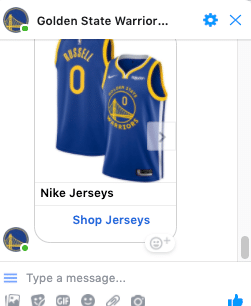 There are many different tasks that you can perform with a chatbot. You can do anything from customer service tasks to selling items, from giving information, to helping people understand your product and service. The reason I love chatbots so much is that they let you, as the business owner, take your potential client on a journey. Now that customer journey we all know can be many steps. It can start with an awareness phase and go all the way through to buying your product and becoming a loyal customer of yours.
A chatbot can take that customer on the journey without you having to hold their hand every single time. Now sometimes in some industries, it can be very time consuming to have that customer journey be effective, especially if you’re the person holding their hand. A chatbot automates all of that. It lets you, as the business owner, do your business, run your business, do the things you’ve got to do while the chatbot takes care of that customer journey for you.
Do people really like to talk to a bot?
There are all sorts of great things that we’ll get into later about how you can make that journey feel very special to them.
And one of the big questions I’m going to answer right now is “do people really like to talk to a bot?”
And here’s my answer to that.
If you wanted to know the answer to the question ‘Where is a Pizza shop near me’ ” and you want the answer right now, do you care whether it comes from a real person, a Google search, or a chatbot?
No…You don’t care. ( I am guessing 🙂 )
You want the answer now..not when the shop opens later or you have to sit on hold on the phone to get the answer.
Now in this day and age of living right now, we want our answers yesterday. A chatbot supplies that information to people when they want it at the time they’re asking for it, not when you’re ready to deliver it to them. And if you don’t deliver that information at the time they’re looking for it, then you’re going to be waiting and missing out on that customer because they’re going to go and find the answer from somebody else. And that somebody else maybe that person’s new client.
So that’s what a chatbot is.
I hope that makes sense. We’re going to dig into more information about chatbots, how they’re used for business, how you build them, what do you need to do with them? What are the benefits of them? All sorts of cool things.
SwingPointMedia is a marketing company focused on using content marketing, such as written articles, video and podcasts, to attract their customers ideal audiences. This approach has proven to attract higher quality customers while simultaneously reducing the sales cycle by as much as 70%.
SwingPointMedia serves local businesses in Southern California and can be reached by calling 760-422-5176.
You are invited to also attend a free weekly presentation, providing you the tools and strategy to roll out your own content marketing program for your company, or see exactly what SwingPointMedia does for its clients to achieve success. It can be viewed live on SwingPointMedia’s YouTube channel, at 11 am pst.
FAQs
What is a chatbot used for?
- Chatbots are used to answer common questions, capture leads, book appointments, route customer requests, and provide 24/7 first-response support. The best chatbots focus on a few high-value tasks (like lead capture + booking) and hand off to a human for complex situations.
How does a chatbot understand what I mean?
- Most chatbots look for the user’s intent (the goal of the message) and extract key details needed to complete the request. Many systems use NLP to interpret language and match the message to the best intent.
Are chatbots AI?
- Not always. Some chatbots are purely rule-based (buttons and scripted flows). Others use conversational AI—like NLP—to understand language and respond more flexibly.
What’s the difference between a chatbot and live chat?
- A chatbot is automated and can respond instantly at any time. Live chat is handled by a person, which can feel more personal but is limited by staffing and hours. Many businesses use both: chatbot first, then human when needed.
How does a chatbot “take action” like booking an appointment?
- When a chatbot matches an intent (like “book”), it can call an integration to check availability, create the appointment, and confirm the result. This “action step” is often described as fulfillment in chatbot platforms.
Can a chatbot work on my website and social media at the same time?
- Yes. Many businesses run one chatbot experience across multiple channels (website chat + Messenger/Instagram + SMS). The key is keeping the answers consistent and tracking where leads come from.
Do chatbots replace humans?
- A well-designed chatbot reduces repetitive work and speeds up first response, but it doesn’t replace human judgment for complex issues. The goal is triage + speed + convenience, with smart escalation.
What’s an AI chatbot vs a rule-based chatbot?
- Rule-based chatbots follow predetermined paths and buttons. AI chatbots can interpret free-text more naturally using conversational AI techniques like NLP (and sometimes generative AI).
How much does a chatbot cost?
- Costs vary depending on complexity: a basic lead-capture bot is far cheaper than a multi-channel AI bot with integrations. A practical approach is to start with one high-value workflow (lead capture or booking), then expand once it’s converting.
When should a chatbot hand off to a human?
- Hand off when the customer is frustrated, the request is unusual, the bot is uncertain, or the conversation involves sensitive details. A visible “Talk to a person” option is a conversion booster and a trust signal.